

Two web parts on the same SharePoint page often need to communicate. A filter panel should drive the results shown in a list web part. A map should highlight the item selected in a details panel. A summary card should reflect the row selected in a data grid.
SPFx's Dynamic Data API is the built-in, framework-supported way to wire up this communication — without hacks like writing to sessionStorage, postMessage gymnastics, or event bus singletons attached to window.
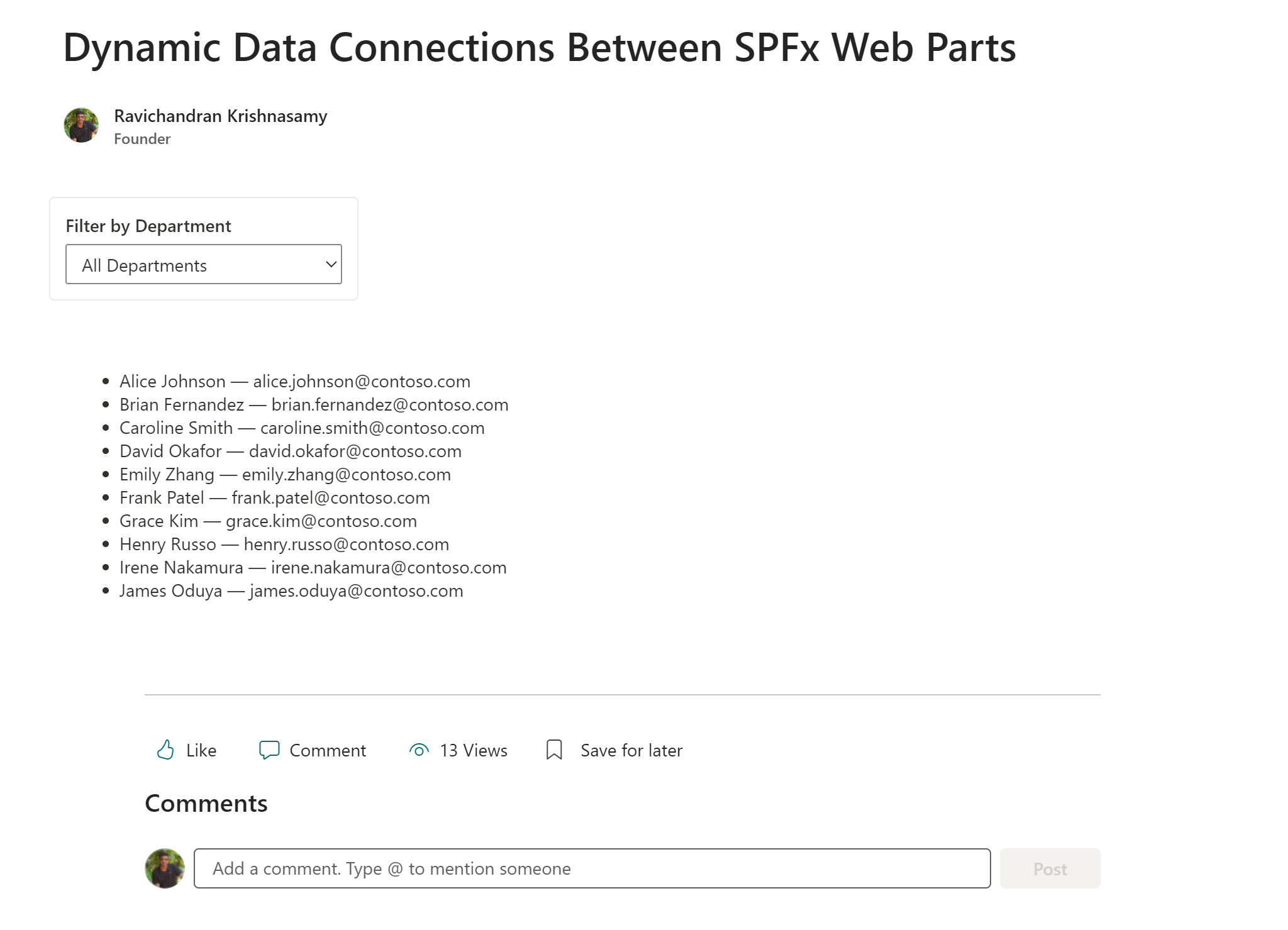
This article builds a complete provider and consumer pair: a Department Filter web part that publishes the selected department, and a Staff Directory web part that subscribes to it and re-fetches from SharePoint on every change.
🗺️ How Dynamic Data Works
The Dynamic Data API has three parts:
| Part | What it does |
|---|---|
| Provider | Registers a DynamicDataSourceManager and publishes values via notifyPropertyChanged |
| Consumer | Connects to a provider's data source and receives updates via DynamicProperty<T> |
| Connection | Configured by the page editor in the property pane — no code hard-wires a specific provider to a specific consumer |
This decoupling is intentional. The provider has no knowledge of which consumers exist. The consumer never hard-codes a specific provider instance. The page editor connects them at authoring time — exactly the same way the built-in SharePoint List web part and Filter web part connect.
📋 SharePoint List Setup
Create a list named Staff with these columns:
| Column | Type |
|---|---|
| Title | Single line of text (full name) |
| Department | Choice (eng, hr, fin, mkt) |
| Single line of text |
Add a few test entries — use department IDs eng, hr, fin, mkt in the Department column so the filter query matches exactly.
🧩 Step 1 — The Provider Web Part
The provider implements IDynamicDataCallables, registers itself as a data source, and calls notifyPropertyChanged whenever its value changes.
src/webparts/departmentFilter/DepartmentFilterWebPart.ts
import {
  BaseClientSideWebPart,
  IPropertyPaneConfiguration
} from '@microsoft/sp-webpart-base';
import {
  IDynamicDataPropertyDefinition,
  IDynamicDataCallables
} from '@microsoft/sp-dynamic-data';
import * as React from 'react';
import * as ReactDOM from 'react-dom';
import DepartmentFilter from './components/DepartmentFilter';

export interface IDepartmentData {
  department: string;
  departmentId: string;
}

export default class DepartmentFilterWebPart
  extends BaseClientSideWebPart<{}>
  implements IDynamicDataCallables {

  private _selectedDepartment: IDepartmentData = {
    department: '',
    departmentId: ''
  };

  protected onInit(): Promise<void> {
    // Register this web part as a Dynamic Data source
    this.context.dynamicDataSourceManager.initializeSource(this);
    return Promise.resolve();
  }

  // Required by IDynamicDataCallables — describes what this source publishes
  public getPropertyDefinitions(): ReadonlyArray<IDynamicDataPropertyDefinition> {
    return [
      {
        id: 'department',
        title: 'Selected Department'
      }
    ];
  }

  // Required by IDynamicDataCallables — returns the current value when consumers ask
  public getPropertyValue(propertyId: string): IDepartmentData {
    if (propertyId === 'department') {
      return this._selectedDepartment;
    }
    throw new Error(`Unknown property: ${propertyId}`);
  }

  public render(): void {
    ReactDOM.render(
      React.createElement(DepartmentFilter, {
        onDepartmentSelected: (dept: IDepartmentData) => {
          this._selectedDepartment = dept;
          // Push the update to all connected consumers
          this.context.dynamicDataSourceManager.notifyPropertyChanged('department');
        }
      }),
      this.domElement
    );
  }

  protected getPropertyPaneConfiguration(): IPropertyPaneConfiguration {
    return { pages: [] };
  }
}
src/webparts/departmentFilter/components/DepartmentFilter.tsx
The filter component uses a plain <select> styled with an SCSS module — no Fluent UI v9 dependency needed here.
import * as React from 'react';
import { IDepartmentData } from '../DepartmentFilterWebPart';
import styles from './DepartmentFilter.module.scss';

const DEPARTMENTS = [
  { id: 'all', name: 'All Departments' },
  { id: 'eng', name: 'Engineering' },
  { id: 'hr',  name: 'Human Resources' },
  { id: 'fin', name: 'Finance' },
  { id: 'mkt', name: 'Marketing' }
];

interface IDepartmentFilterProps {
  onDepartmentSelected: (dept: IDepartmentData) => void;
}

const DepartmentFilter: React.FC<IDepartmentFilterProps> = ({ onDepartmentSelected }) => {
  const [selected, setSelected] = React.useState('all');

  const handleChange = (e: React.ChangeEvent<HTMLSelectElement>): void => {
    const value = e.target.value;
    const dept = DEPARTMENTS.find(d => d.id === value);
    setSelected(value);
    onDepartmentSelected({
      department: dept?.name ?? '',
      departmentId: value
    });
  };

  return (
    <div className={styles.container}>
      <label className={styles.label} htmlFor="dept-filter">
        Filter by Department
      </label>
      <select
        id="dept-filter"
        className={styles.select}
        value={selected}
        onChange={handleChange}
      >
        {DEPARTMENTS.map(dept => (
          <option key={dept.id} value={dept.id}>{dept.name}</option>
        ))}
      </select>
    </div>
  );
};

export default DepartmentFilter;
src/webparts/departmentFilter/components/DepartmentFilter.module.scss
.container {
  padding: 12px;
  background: #ffffff;
  border-radius: 4px;
  border: 1px solid #edebe9;
  display: inline-flex;
  flex-direction: column;
  gap: 6px;
  min-width: 220px;
}

.label {
  font-size: 14px;
  font-weight: 600;
  color: #323130;
  font-family: "Segoe UI", sans-serif;
}

.select {
  font-size: 14px;
  font-family: "Segoe UI", sans-serif;
  color: #323130;
  background: #ffffff;
  border: 1px solid #8a8886;
  border-radius: 2px;
  padding: 5px 8px;
  height: 32px;
  cursor: pointer;
  outline: none;
  width: 100%;

  &:hover {
    border-color: #323130;
  }

  &:focus {
    border-color: #0078d4;
    box-shadow: 0 0 0 1px #0078d4;
  }
}
🧩 Step 2 — The Consumer Web Part
The consumer uses DynamicProperty<T> to hold a reference to the connected source, and PropertyPaneDynamicField to expose the connection UI in the property pane.
src/webparts/staffDirectory/StaffDirectoryWebPart.ts
import * as React from 'react';
import * as ReactDom from 'react-dom';
import { BaseClientSideWebPart } from '@microsoft/sp-webpart-base';
import { DynamicProperty } from '@microsoft/sp-component-base';
import {
  IPropertyPaneConfiguration,
  PropertyPaneDynamicField,
  PropertyPaneDynamicFieldSet,
  DynamicDataSharedDepth
} from '@microsoft/sp-property-pane';
import { SPFI, spfi, SPFx } from '@pnp/sp';
import '@pnp/sp/webs';
import '@pnp/sp/lists';
import '@pnp/sp/items';
import { IDepartmentData } from '../departmentFilter/DepartmentFilterWebPart';
import StaffDirectory from './components/StaffDirectory';

// Web part property bag — only what the property pane stores
export interface IStaffDirectoryWebPartProps {
  filterSource: DynamicProperty<IDepartmentData>;
}

// Component props — what the React component actually receives
export interface IStaffDirectoryComponentProps {
  sp: SPFI;
  departmentFilter: IDepartmentData | null;
  isConnected: boolean;
}

export default class StaffDirectoryWebPart
  extends BaseClientSideWebPart<IStaffDirectoryWebPartProps> {

  private _sp: SPFI;

  protected onInit(): Promise<void> {
    this._sp = spfi().using(SPFx(this.context));

    // Re-render when providers are added or removed from the page
    this.context.dynamicDataProvider.registerAvailableSourcesChanged(
      this._onSourcesChanged.bind(this)
    );
    return Promise.resolve();
  }

  private _onSourcesChanged(): void {
    this.render();
  }

  public render(): void {
    const filterValue = this.properties.filterSource?.tryGetValue();

    const element: React.ReactElement<IStaffDirectoryComponentProps> = React.createElement(StaffDirectory, {
      sp: this._sp,
      departmentFilter: filterValue ?? null,
      isConnected: !!this.properties.filterSource?.tryGetSource()
    });

    ReactDom.render(element, this.domElement);
  }

  protected getPropertyPaneConfiguration(): IPropertyPaneConfiguration {
    return {
      pages: [{
        groups: [{
          groupName: 'Filter Connection',
          groupFields: [
            PropertyPaneDynamicFieldSet({
              label: 'Connect to a filter web part',
              fields: [
                PropertyPaneDynamicField('filterSource', {
                  label: 'Department filter'
                })
              ],
              sharedConfiguration: {
                depth: DynamicDataSharedDepth.Source
              }
            })
          ]
        }]
      }]
    };
  }
}
src/webparts/staffDirectory/components/StaffDirectory.tsx
import * as React from 'react';
import { SPFI } from '@pnp/sp';
import '@pnp/sp/webs';
import '@pnp/sp/lists';
import '@pnp/sp/items';
import { IDepartmentData } from '../../departmentFilter/DepartmentFilterWebPart';
import { IStaffDirectoryComponentProps } from '../StaffDirectoryWebPart';

interface IStaffItem {
  Id: number;
  Title: string;
  Department: string;
  Email: string;
}

const StaffDirectory: React.FC<IStaffDirectoryComponentProps> = ({
  sp, departmentFilter, isConnected
}) => {
  const [staff, setStaff] = React.useState<IStaffItem[]>([]);
  const [loading, setLoading] = React.useState<boolean>(true);

  React.useEffect(() => {
    if (!sp) return;

    setLoading(true);

    let query = sp.web.lists
      .getByTitle('Staff')
      .items
      .select('Id', 'Title', 'Department', 'Email');

    // Apply department filter from the connected provider — show all if unset or 'all'
    if (departmentFilter?.departmentId && departmentFilter.departmentId !== 'all') {
      query = query.filter(`Department eq '${departmentFilter.departmentId}'`);
    }

    query().then((items: IStaffItem[]) => {
      setStaff(items);
      setLoading(false);
    }).catch(() => setLoading(false));

  }, [departmentFilter?.departmentId]);

  return (
    <div style={{ padding: '16px', fontFamily: '"Segoe UI", sans-serif' }}>

      {!isConnected && (
        <p style={{ color: '#605e5c', fontSize: '13px', marginBottom: '12px' }}>
          ℹ️ Edit this web part and connect a filter source to enable filtering.
        </p>
      )}

      {departmentFilter?.department && departmentFilter.departmentId !== 'all' && (
        <p style={{ fontWeight: 600, fontSize: '14px', marginBottom: '12px', color: '#323130' }}>
          Showing: {departmentFilter.department}
        </p>
      )}

      {loading ? (
        <p style={{ color: '#605e5c', fontSize: '13px' }}>Loading...</p>
      ) : staff.length === 0 ? (
        <p style={{ color: '#605e5c', fontSize: '13px' }}>No staff found.</p>
      ) : (
        <table style={{ width: '100%', borderCollapse: 'collapse', fontSize: '14px' }}>
          <thead>
            <tr style={{ borderBottom: '2px solid #edebe9' }}>
              <th style={{ textAlign: 'left', padding: '8px', color: '#323130' }}>Name</th>
              <th style={{ textAlign: 'left', padding: '8px', color: '#323130' }}>Department</th>
              <th style={{ textAlign: 'left', padding: '8px', color: '#323130' }}>Email</th>
            </tr>
          </thead>
          <tbody>
            {staff.map(s => (
              <tr key={s.Id} style={{ borderBottom: '1px solid #f3f2f1' }}>
                <td style={{ padding: '8px', color: '#323130' }}>{s.Title}</td>
                <td style={{ padding: '8px', color: '#605e5c' }}>{s.Department}</td>
                <td style={{ padding: '8px' }}>
                  <a href={`mailto:${s.Email}`} style={{ color: '#0078d4' }}>{s.Email}</a>
                </td>
              </tr>
            ))}
          </tbody>
        </table>
      )}

    </div>
  );
};

export default StaffDirectory;
🔗 Connecting Them on a Page
- Add both web parts to the same SharePoint page
- Edit the Staff Directory web part → open the property pane
- In the Filter Connection group, click Connect to source
- Select Department Filter as the source and Selected Department as the property
- Save — the table now re-fetches whenever the dropdown selection changes
The connection is stored in the page's web part instance data. No code changes are needed to wire a specific provider to a specific consumer — the editor does it.
🚀 Deploy the Solution
npm run build
npm run bundle -- --ship
npm run package-solution -- --ship
Upload the generated .sppkg to your App Catalog and deploy. Add both web parts to the same modern SharePoint page and connect them via the property pane.
📂 GitHub Source
View full SPFx project on GitHub:SPFx dynamic data provider + consumer sample — event-driven cross-web part communication
✅ Summary
- Provider web parts implement
IDynamicDataCallablesand register viadynamicDataSourceManager.initializeSource(this) - Call
notifyPropertyChanged('propertyId')after every state update — all connected consumers re-render automatically - Consumer web parts use
DynamicProperty<T>andPropertyPaneDynamicField— the page editor makes the connection, not the code - Separate the web part property bag interface (
IStaffDirectoryWebPartProps) from the component props interface (IStaffDirectoryComponentProps) — reusing one interface for both causes type errors - Always initialize
_spinonInit()viaspfi().using(SPFx(this.context))— it is not available in the constructor - Use
tryGetValue()on theDynamicProperty— it returnsundefinedwhen the connection is not yet configured, so always provide a fallback - Dynamic Data does not work across isolated web part boundaries — both web parts must be non-isolated on the same page
Happy coding!