

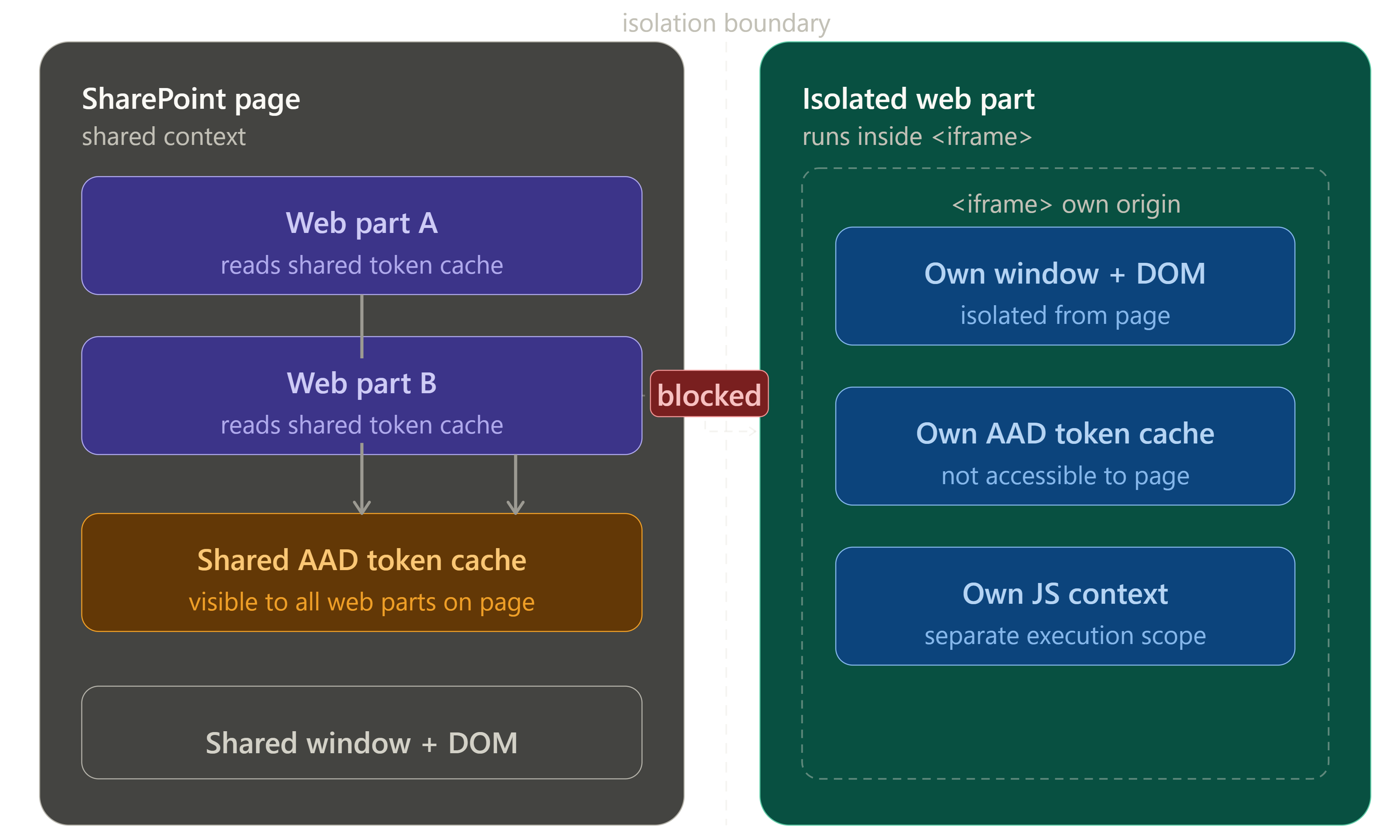
SPFx 1.8 introduced isolated web parts — a mode where the web part runs inside its own <iframe> rather than the shared SharePoint page context. For most solutions, this is unnecessary overhead. For a specific set of security-sensitive scenarios, it is the only correct architectural choice.
This article explains exactly what isolation does, what it costs, and when it is worth it.
🗺️ What Isolation Means
By default, all SPFx web parts on a page share the same JavaScript execution context — the same window object, the same DOM, and critically, the same AAD token cache. A malicious or poorly written web part on the same page could, in theory, access tokens acquired by other web parts.
An isolated web part runs in a separate <iframe> with its own origin (*.sharepointonline.com subdomain). This gives it:
- Its own
windowobject — completely separate from the main page - Its own JavaScript execution context — no shared state with other web parts
- Its own AAD token issuance — tokens are scoped to the iframe's origin, not the page origin
- Its own Content Security Policy — cross-frame communication is restricted
The isolation is enforced by the browser's same-origin policy — not just by code conventions.
🔐 The Security Case for Isolation
The primary driver for isolation is sensitive permission scopes.
When an SPFx solution requests a permission scope like Mail.ReadWrite, Files.ReadWrite.All, or User.ReadWrite.All, that permission is granted to the shared SharePoint Online Client Extensibility application principal — meaning any other SPFx web part on the same page could potentially access a token with those scopes.
In an isolated web part, the permission is granted to a dedicated AAD application registered specifically for the isolated solution. Other web parts on the page have no access to this application's tokens — the iframe boundary enforces the separation.
Scenarios that warrant isolation:
| Scenario | Why isolation matters |
|---|---|
Web part handles Mail.ReadWrite or sensitive mailbox access | Prevents other page scripts from acquiring mail tokens |
| Web part stores or processes PII (medical records, HR data) | Reduces attack surface for cross-page script injection |
| Web part integrates with a high-privilege external system | Limits blast radius if the page is compromised |
| ISV solution deployed to unknown tenant environments | Vendor has no control over what else is on the page |
| Compliance requirement mandates execution boundary isolation | Regulatory / audit requirement for data compartmentalisation |
💸 The Cost of Isolation
Isolation is not free. Before choosing it, weigh these tradeoffs:
Performance. Isolated web parts load in an iframe — an additional document fetch, a separate JavaScript context initialisation, and cross-frame communication overhead for any interaction with the parent page. On a page with multiple isolated web parts, this overhead compounds.
No access to the shared page context. An isolated web part cannot read this.context.pageContext from the parent page — it has its own page context scoped to the iframe origin. SharePoint site theme tokens, the current user's profile from the parent context, and navigation data are not available directly.
No dynamic data connections. The SPFx Dynamic Data API — which allows web parts to communicate data between each other on the same page — does not work across isolation boundaries. Isolated and non-isolated web parts on the same page are fully separate.
Separate deployment and App Catalog entry. Isolated web parts require their own solution package and their own AAD app registration — they cannot share an App Catalog entry with non-isolated web parts.
Property pane limitations. Some property pane controls that rely on the parent page context (for example, site-specific data loaders) behave differently inside an iframe.
⚙️ Enabling Isolation
In config/package-solution.json:
{
  "solution": {
    "name": "sensitive-data-web-part-client-side-solution",
    "id": "your-solution-id",
    "version": "1.0.0.0",
    "isolated": true,
    "isDomainIsolated": true,
    "webApiPermissionRequests": [
      {
        "resource": "Microsoft Graph",
        "scope": "Mail.ReadWrite"
      }
    ]
  }
}
isDomainIsolated: true is the key setting. When this is enabled:
- The solution gets its own dedicated AAD application in the tenant
- Web parts from this solution run in iframes with a unique
*.sharepointonline.comsubdomain origin - Permission requests are granted to the dedicated app, not the shared extensibility principal
The tenant admin approves permissions for the isolated solution separately in the API access page — isolated and non-isolated permissions are listed independently.
🔀 Communication Across the Isolation Boundary
If an isolated web part needs to communicate with a non-isolated web part or the parent page, use the postMessage API:
// Inside the isolated web part — send a message to the parent page
window.parent.postMessage(
  JSON.stringify({ type: 'DATA_LOADED', payload: { itemCount: 42 } }),
  'https://contoso.sharepoint.com'  // Specify the target origin — never use '*'
);
// In the parent page (or another web part) — listen for messages
window.addEventListener('message', (event) => {
  // Always validate the origin
  if (event.origin !== 'https://contoso-isolated.sharepointonline.com') return;

  const data = JSON.parse(event.data);
  if (data.type === 'DATA_LOADED') {
    console.log('Isolated web part loaded', data.payload.itemCount, 'items');
  }
});
Always validate the message origin — accepting messages from any origin (*) defeats the security purpose of isolation.
🤔 The Decision Framework
Does the web part request sensitive Graph scopes?
(Mail.ReadWrite, Files.ReadWrite.All, User.ReadWrite.All, etc.)
  └── YES → Does the organisation have other unvetted SPFx solutions
              deployed to the same tenant?
              ├── YES → USE ISOLATION
              └── NO  → Isolation is a good practice but not strictly required

Does the web part handle regulated PII or sensitive business data?
  └── YES → Does a compliance requirement mandate execution isolation?
              ├── YES → USE ISOLATION
              └── NO  → Consider isolation; evaluate the performance cost

Is this an ISV solution deployed to customer tenants?
  └── YES → Seriously consider isolation — you have no control over
              what else is on the page in customer environments

Are all permission scopes low-sensitivity?
(User.Read, Sites.Read.All, standard read-only access)
  └── YES → DO NOT USE ISOLATION — the performance and complexity
              cost is not justified
✅ Summary
- Isolated web parts run in a separate
<iframe>with their own AAD application — permissions are not shared with other web parts on the page. - The security benefit is token scope containment — a high-privilege isolated web part's tokens cannot be accessed by other scripts on the same page.
- The costs are real: performance overhead per iframe, no shared page context, no dynamic data connections, separate deployment.
- Use isolation for sensitive Graph scopes (
Mail.ReadWrite,Files.ReadWrite.All), compliance-mandated execution boundaries, and ISV solutions deployed to unknown tenants. - Do not use isolation for standard, low-sensitivity read-only solutions — the overhead is not justified.
- When in doubt: isolation is the conservative choice for sensitive data; non-isolation is the correct default for most enterprise intranet web parts.
Happy coding!