

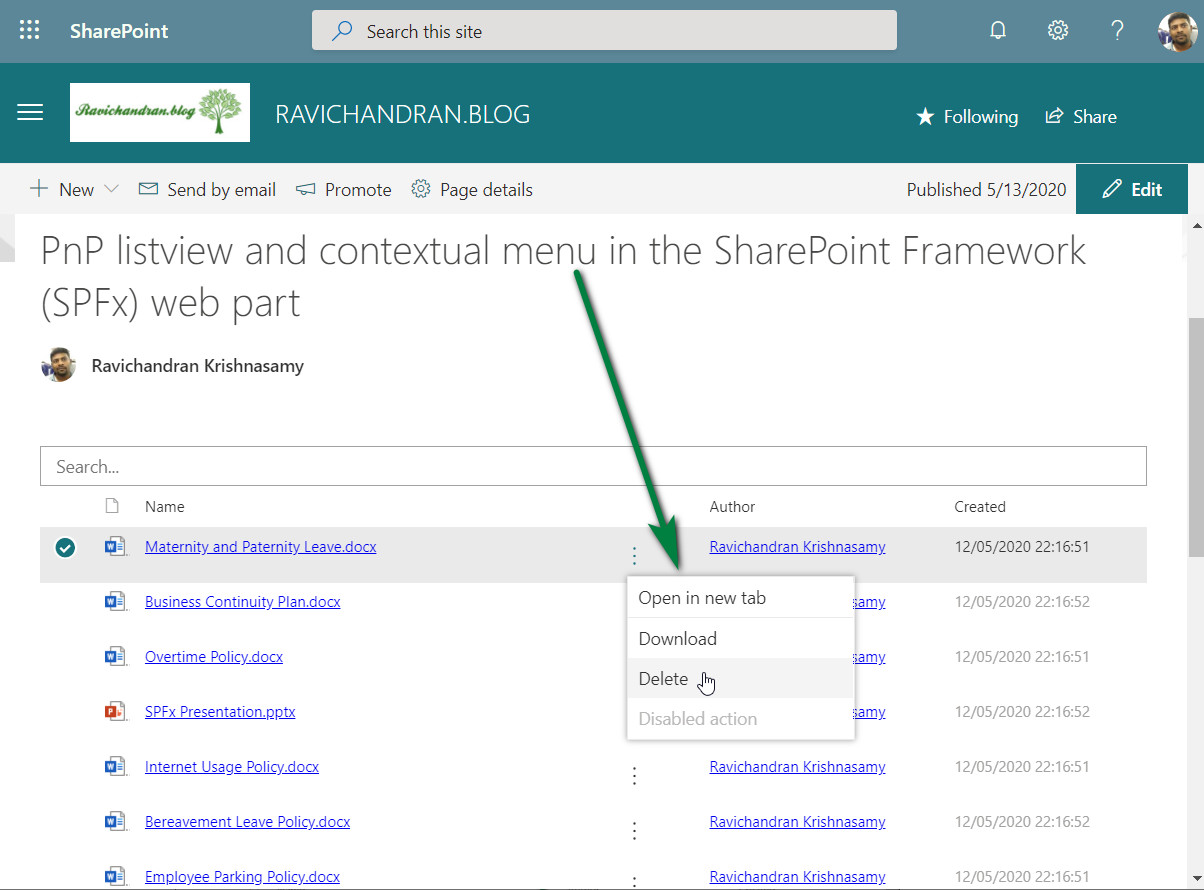
This article explains how to implement the PnP ListView and Contextual Menu in the SharePoint Framework (SPFx) web part.
It allows you to display files in a list view and add actions such as open, download, and delete using the contextual menu options.
📦 Install dependencies
npm install @pnp/sp --save
npm install office-ui-fabric-react --save
npm install moment --save
🧩 filemenu.tsx
import * as React from 'react';
import { IconButton } from 'office-ui-fabric-react';
import { ContextualMenuItemType } from 'office-ui-fabric-react/lib/ContextualMenu';
import { sp } from "@pnp/sp";
import "@pnp/sp/webs";
import "@pnp/sp/lists";
import "@pnp/sp/items";
import { autobind } from 'office-ui-fabric-react/lib/Utilities';

export interface IfilemenuProps {
    item: any;
    context: any;
    ondatachange: any;
}

export class filemenu extends React.Component<IfilemenuProps, {}> {

    public constructor(props: IfilemenuProps) {
        super(props);
        sp.setup({
            spfxContext: this.props.context
        });
        this.state = {
            panelOpen: false
        };
    }

    public render() {
        return (
            <div>
                <IconButton id='ContextualMenuButton1'
                    text=''
                    width='30'
                    split={false}
                    iconProps={{ iconName: 'MoreVertical' }}
                    menuIconProps={{ iconName: '' }}
                    menuProps={{
                        shouldFocusOnMount: true,
                        items: [
                            {
                                key: 'action1',
                                name: 'Open in new tab',
                                onClick: this.handleClick.bind(this, "open", this.props.item)
                            },
                            {
                                key: 'divider_1',
                                itemType: ContextualMenuItemType.Divider
                            },
                            {
                                key: 'action2',
                                name: 'Download',
                                onClick: this.handleClick.bind(this, "download", this.props.item)
                            },
                            {
                                key: 'action3',
                                name: 'Delete',
                                onClick: this.handleClick.bind(this, "delete", this.props.item)
                            },
                            {
                                key: 'disabled',
                                name: 'Disabled action',
                                disabled: true,
                                onClick: () => console.error('Disabled action should not be clickable.')
                            }
                        ]
                    }} />
            </div>
        );
    }

    @autobind
    private async handleClick(actionType: string, seletedfile: any, event) {
        if (actionType === 'open') {
            window.open(
                window.location.protocol + "//" + window.location.host + seletedfile.ServerRelativeUrl + "?web=1",
                '_blank'
            );
        }
        else if (actionType === 'download') {
            window.open(
                window.location.protocol + "//" + window.location.host + seletedfile.ServerRelativeUrl + "?web=0",
                '_blank'
            );
        }
        else if (actionType === 'delete') {
            let list = sp.web.lists.getByTitle("Policies");
            await list.items.getById(seletedfile["ListItemAllFields.ID"]).delete();
            this.props.ondatachange();
        }
    }
}
🧩 SpfxPnpListviewContextualmenu.tsx
import * as React from 'react';
import { IViewField } from "@pnp/spfx-controls-react/lib/ListView";
import { filemenu, IfilemenuProps } from './filemenu';
import { sp } from "@pnp/sp";
import "@pnp/sp/webs";
import "@pnp/sp/lists";
import "@pnp/sp/items";
import * as moment from 'moment';

export default class SpfxPnpListviewContextualmenu extends React.Component<ISpfxPnpListviewContextualmenuProps, ISpfxPnpListviewContextualmenuState> {
  constructor(props: ISpfxPnpListviewContextualmenuProps, state: ISpfxPnpListviewContextualmenuState) {
    super(props);
    sp.setup({
      spfxContext: this.props.context
    });
    var _viewFields: IViewField[] = [
      {
        name: "Name",
        linkPropertyName: "ServerRelativeUrl",
        displayName: "Name",
        sorting: true,
        minWidth: 250,
      },
      {
        name: "",
        sorting: false,
        maxWidth: 40,
        render: (rowitem: any) => {
          const element: React.ReactElement<IfilemenuProps> = React.createElement(
            filemenu,
            {
              item: rowitem,
              context: this.props.context,
              ondatachange: this._getfiles
            }
          );
          return element;
        }
      },
      {
        name: "Author.Title",
        displayName: "Author",
        sorting: false,
        minWidth: 180,
        render: (item: any) => {
          const authoremail = item['Author.UserPrincipalName'];
          return <a href={'mailto:' + authoremail}>{item['Author.Title']}</a>;
        }
      },
      {
        name: "TimeCreated",
        displayName: "Created",
        minWidth: 150,
        render: (item: any) => {
          const created = item["TimeCreated"];
          if (created) {
            const createdDate = moment(created);
            return <span>{createdDate.format('DD/MM/YYYY HH:mm:ss')}</span>;
          }
        }
      }
    ];
    this.state = { items: [], viewFields: _viewFields };
    this._getfiles();
  }
}
🚀 Deploy the solution
Build, bundle, and package the SPFx web part:
gulp build
gulp bundle --ship
gulp package-solution --ship
Upload the .sppkg file to your App Catalog, deploy it, and add the PnP ListView Contextual Menu web part to your SharePoint page.
📂 GitHub Source
View full SPFx project on GitHub:PnP Listview and contextual menu in the SharePoint Framework (SPFx) web part
✅ Summary
This example shows how to combine PnP ListView and Fluent UI Contextual Menu for SharePoint to display, open, download, and delete files easily.
It provides a powerful and modern user experience for document libraries using the SPFx framework.